

Datasets
A dataset is the set of cases one workflow is judged on. Each case is a start payload and the Result that payload should produce.
Create a dataset
In ROC. Open the workflow, select Evaluations → Datasets, then New dataset. On a workflow with no dataset, choose Create empty dataset, or Create from recent executions to start from real runs. Give it a Name, an optional Description, and optional limits: Max duration (s), Max tokens, Max steps, Max cost ($). The sidebar Evaluations page has the same New dataset button with a Workflow picker. A workflow with no published version has no scope yet, so creating a dataset for it asks you to publish it once first — its evaluations live in the scope it runs in.
With the CLI. Run it in the workflow’s project folder; --workflow defaults to the workflow your manykind.config.ts (or dist/) declares.
mk eval create triage --description "support tickets by category" --max-duration-ms 30000| Flag | Meaning |
|---|---|
--description <text> |
What the dataset covers |
--max-duration-ms <n> |
Warn when a run takes longer |
--max-tokens <n> |
Warn when a run uses more tokens |
--max-steps <n> |
Warn when a run takes more steps |
--max-cost <n> |
Warn when a run costs more |
Dataset names match ^[a-z0-9][a-z0-9-]{0,62}$ and are unique per workflow. Every mk eval command needs store credentials.
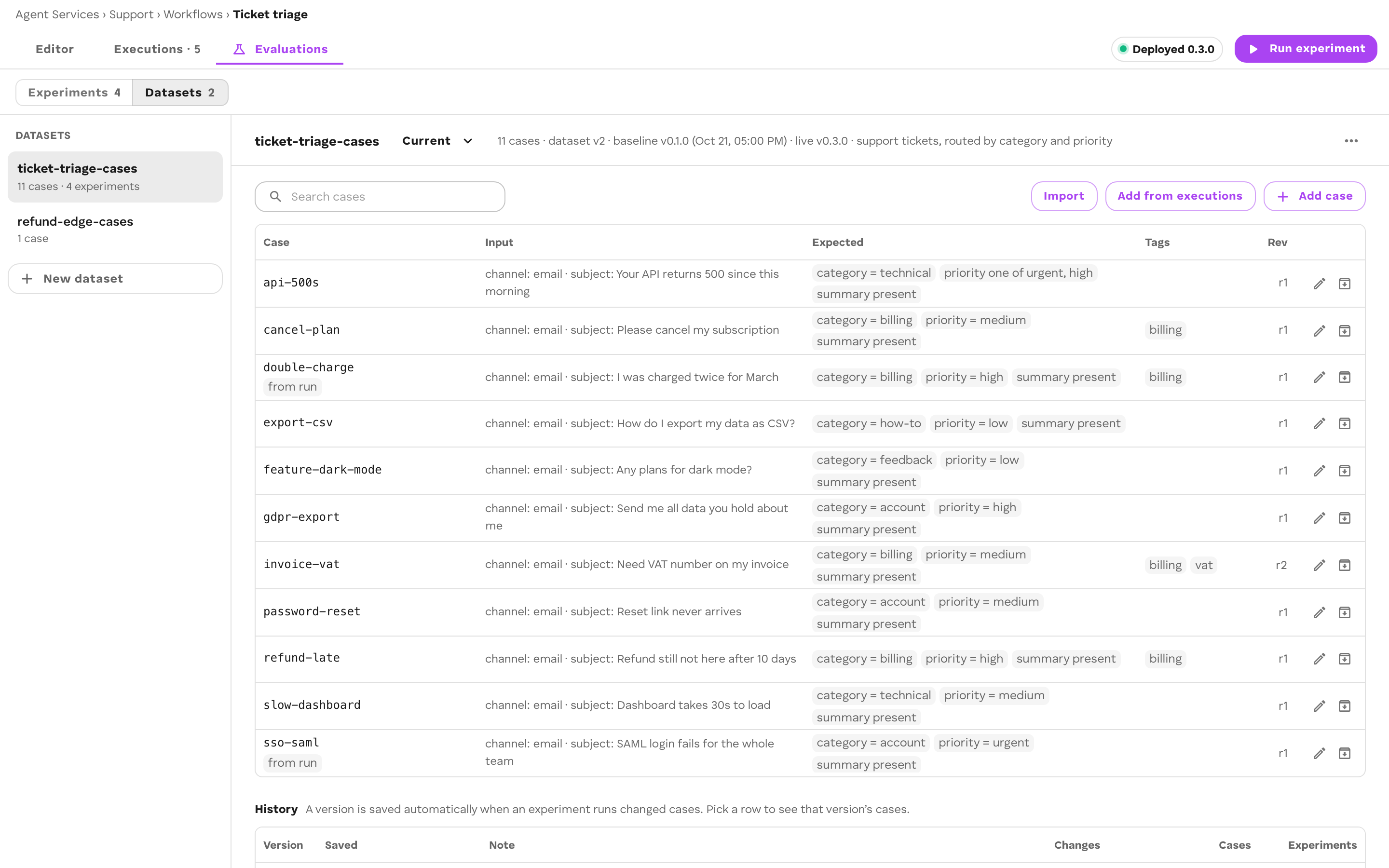
Case shape
{ "id": "double-charge", "input": { "ticketId": "T-1001", "text": "I was charged twice for March" }, "expected": { "category": "billing", "confidence": ">= 0.8", "summary": { "$exists": true } }, "limits": { "maxDurationMs": 20000 }, "tags": ["billing"], "notes": "Seen in production twice in one week."}| Field | Required | Meaning |
|---|---|---|
id |
yes | [A-Za-z0-9._-], 1–80 characters. Stays taken after the case is deleted. |
input |
yes | The workflow.start payload, as an object. |
expected |
no | Keyed by Result field; dot paths reach nested fields. A case with no expectations runs but is not scored. See Results. |
limits |
no | maxDurationMs, maxTokens, maxSteps, maxCost. Each overrides the dataset’s own. |
tags |
no | Free labels for filtering. |
notes |
no | Free text. |
source |
no | Set when the case was captured from a run: { context, workflowVersion?, capturedAt }. |
input is exactly what an experiment publishes as workflow.start, so it must contain everything your trigger step reads.
Add cases by hand
In ROC, open the dataset in the Datasets view and select Add case. Fill in Case id, Input (workflow.start payload), the Expected result, Tags, and Notes. Editing a case and choosing Save revision writes a new revision; the old one stays.
In your repo, pull the dataset, edit the JSON, and push it back:
mk eval pull triage # writes datasets/triage/$EDITOR datasets/triage/cases/double-charge.jsonmk eval push triagepull writes this layout (change it with --dir):
datasets/triage/header.json the dataset header (without the baseline)datasets/triage/cases/<caseId>.json each live case at its latest revisiondatasets/triage/.versions.json what the last pull wrote: revisions, content hashes, versionsA case file must be named <id>.json. Commit the folder with your workflow so cases are reviewed in the same pull request as the change they test.
| Command | Flag | Meaning |
|---|---|---|
pull |
--force |
Overwrite case files edited locally since the last pull or push |
push |
--cut [note] |
Cut a dataset version after pushing |
push |
--force |
Write over cases that changed in the vault since the last pull |
push |
--prune |
Delete cases the last pull wrote that you have since removed locally |
push |
--restore |
Undelete or unarchive cases that are deleted or archived in the vault but present locally |
push writes a new revision only for a case whose content changed. Without --force, it refuses a case that someone edited in the vault since your last pull, and pull refuses to overwrite a case file you edited locally. Neither removes a case file the last pull did not write. Both refuse a dataset folder whose header.json names another workflow.
Add cases from real runs
A run that went wrong in production is the best case you will get. Capture it instead of retyping it.
In ROC:
- On a run on the Runs tab, select the Add to dataset icon next to Re-run. Pick a Dataset (or New dataset… and a New dataset name) and confirm the Case id.
- In a dataset’s cases, select Add from executions and pick from the workflow’s recent runs.
In code, caseFromRun from @manykind-ai/eval builds the same case:
import { addCase, caseFromRun, uniqueCaseId, listCaseIds } from "@manykind-ai/eval";
const c = caseFromRun({  input: startPayload,                 // the run's workflow.start payload  output: completedPayload.output,     // workflow.completed output, if the run completed  context: "support-4821",  workflowVersion: "1.3.0",  tags: ["from-production"],});c.id = uniqueCaseId(c.id, await listCaseIds(store, "ticket-triage", "triage"));await addCase(store, "ticket-triage", "triage", c);
What a captured case expects:
| The run’s output field is | The case expects |
|---|---|
| A label (60 characters or fewer and 8 words or fewer) | That exact value |
| Free text (longer than that) | { "$exists": true }: the field is present |
| Not an object, or the run did not complete | No expectations: state them yourself |
An inline graph in the start payload is dropped from the input.
A captured case expects what the workflow did, not what it should have done. Review every captured expectation before you run an experiment, and fix the ones that captured the bug.
With the CLI, name the run contexts to capture. For each context, mk eval capture reads that run’s workflow.start payload (the case input) and its workflow.completed output (the expected Result) from the vault, and adds a case:
mk eval capture triage support-4821 # one run → one casemk eval capture triage support-4821 support-5133 --workflow-version 1.3.0mk eval capture triage support-4821 --id double-charge # name the case (single context)mk eval capture triage support-4821 --dry-run # build and print, write nothing| Flag | Meaning |
|---|---|
--id <caseId> |
Name the case; only with a single context, otherwise the id is derived from the context |
--workflow-version <v> |
Stamp this version on each case’s source (does not change what is read) |
--dry-run |
Build and print the cases, write nothing |
It reads the vault only — no orchestrator, so no --as-pubkey. It is idempotent: it dedupes the contexts, skips any already captured as a case’s source.context, and refuses an --id that already exists, so re-running the same contexts writes nothing. A run with no workflow.start is skipped with a note rather than written as a blank case.
Import cases
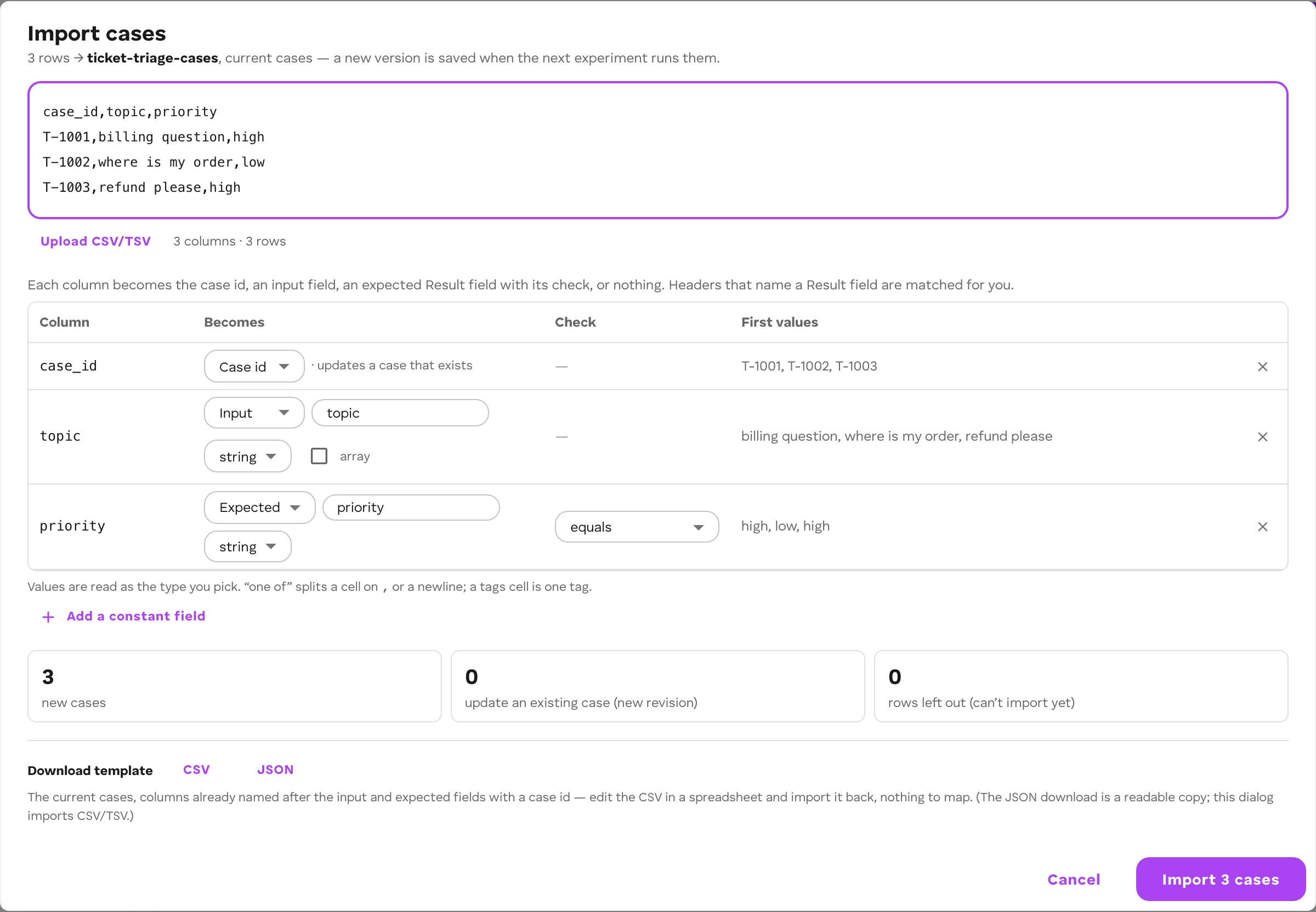
Add many cases at once from a spreadsheet or a CSV/TSV, mapping each column to a case field.
In a dataset’s cases, select Import. Paste a spreadsheet selection (tab-separated) or Upload CSV/TSV — the first row is the header. Each column gets a row in a mapping table:
- Becomes — Case id, Input (a field; tick array to wrap the cell in a one-element array), Expected with its Check, Tags, Notes, or Ignore. A header named
input.<field>orexpected.<field>(what the template downloads) is matched back to its role for you. - type — how the cell is read:
string,number,boolean, orjson. - Check (Expected only) — equals, one of (splits the cell on
,or a newline), contains, ≥, or ≤.
Add a constant field for a value set on every row (for example a consent of true). A preview tallies new cases and cases that update an existing case (new revision), and lists the rows left out — a row with no id, an invalid id, or a duplicate id, each with its reason. A bad cell (not the number or JSON its column expects) is reported, but the row still imports. A tags cell is one tag.
Download template writes the current cases as a CSV whose columns are already named input.<field> / expected.<field> with a case id — edit it in a spreadsheet and import it back with nothing to map. JSON downloads a readable copy; the dialog imports CSV/TSV, not JSON.
With the CLI, pass the file and a JSON column mapping (a TableMapping). The dataset is created if it does not exist.
mk eval import triage --from cases.csv --map mapping.jsonmk eval import triage --from cases.tsv --map mapping.json --delimiter tab --cut "imported Q3 tickets"mk eval import triage --from cases.csv --map mapping.json --dry-run # parse and map, write nothing| Flag | Meaning |
|---|---|
--from <file> |
CSV/TSV file, one row per case (required) |
--map <file> |
JSON column mapping, a TableMapping (required) |
--delimiter <d> |
comma, tab, or auto (default auto) |
--cut [note] |
Cut a dataset version after importing |
--dry-run |
Parse and map, print what would be added, write nothing |
Each mapped row is saved with saveCase, so a row whose id matches a case writes a new revision and an unchanged row writes nothing. ROC and the CLI share the same parse and mapping core (casesFromTable), so a mapping behaves the same in both.
Required for release
Select Not required for release in the dataset’s heading, switch on Required for release, and pick a rule: Not worse than live (accuracy may not drop below the live release’s) or Accuracy at least N%. Release then runs the dataset and gives no version number until it passes; cost, tokens, and duration are shown on the release but never block it. The dataset list marks it Required. See Release and deploy.
Archive and delete
| Action | Effect |
|---|---|
| Archive | Hides the case from new dataset versions. Its bytes are untouched; versions that pin it still load. |
| Delete | Removes the case from the working set. Its revisions stay (versions may pin them) and its id stays taken. |
Both are reversible. mk eval push --restore brings a case back if it is still in your repo folder.
With the CLI, archive a case or, with --undo, unarchive it (the case must exist in the dataset, or the command errors):
mk eval archive triage double-chargemk eval archive triage double-charge --undoVersions
You rarely cut a version by hand. When an experiment starts without a dataset version, it compares the working set (every live case at its latest revision) with the latest version:
- unchanged: the experiment runs that version;
- changed: a new version is cut with the note
auto: <n> added, <m> edited, <k> removed, and the experiment runs it.
mk eval push --cut "note" cuts one explicitly. The History table in the Datasets view lists each version with Version, Saved, Note, Changes, Cases, and Experiments. mk eval versions triage prints the same history, newest first — version, when it was cut, its note, what changed, its case count, and how many experiments ran it (it errors if the dataset does not exist).
A version pins each case at one revision by sha256. Revisions are never rewritten, so an experiment from months ago reloads exactly the cases it ran.
Storage
Datasets live in the vault scope the workflow runs in (its live version’s scope, otherwise its newest version’s), beside the experiments that ran them, under an evals/ prefix:
evals/workflows/<wf>/datasets/<dataset>/header.json header (+ baselineId)evals/workflows/<wf>/datasets/<dataset>/cases/<caseId>/r<n>.json write-once revisionsevals/workflows/<wf>/datasets/<dataset>/cases/<caseId>/deleted.json delete flagevals/workflows/<wf>/datasets/<dataset>/archived/<caseId>.json archive flagevals/workflows/<wf>/datasets/<dataset>/versions/v<n>.json frozen versionsevals/workflows/<wf>/experiments/<expId>/… experiments and their runs<wf> is the workflow’s id (its agent alias). ROC, the CLI, and @manykind-ai/eval read and write the same objects. Access is the scope’s grant: write on the scope to create or edit datasets and run experiments, read to see them.
Write access follows the scope the workflow runs in: anyone who can write that scope can change a dataset — and so what counts as a pass. Treat it like write access to the workflow it tests.
Related
- Next: Experiments
- Evaluations overview
- Results: how
expectedis matched @manykind-ai/evalreference